Cognity vs Turnitin Clarity: two ways to see the writing process
Turnitin Clarity and Cognity both show how student writing was produced, with an AI assistant inside the writing space. Clarity is a paid add-on to Turnitin Feedback Studio that also checks for AI-generated writing. Cognity is a classroom AI workspace a teacher can start free, with no detection score and a live view during the lesson.
Turnitin's own line for Clarity is "Don't just detect AI. Understand it."¹ We agree with the sentence. The two products get there differently, and the differences matter depending on who you are.
This comparison is written by the Cognity team, so read it with that in mind. We checked Turnitin's Clarity product page and its 24 February 2026 press release on 29 September 2026, and we link them so you can check.
What does Turnitin Clarity show?
Clarity gives students a writing space inside their institution's LMS, where they see the assignment instructions and rubric and write their submission.¹ Instructors can view the whole drafting process, including pasted text, writing time, construction time and draft history, with a playback that flags points of interest.¹
It includes an optional AI assistant that instructors configure, with guardrails so that it never writes on the student's behalf, and instructors can set AI usage policies for each assignment.¹ Assignments can also be connected into checkpoints, so students revise earlier drafts rather than start over.¹
Clarity integrates with Turnitin Feedback Studio as a paid add-on and works alongside Turnitin Originality, and Turnitin says it also checks for AI-generated writing and copy-pasting.¹² The product page lists no price; it offers a demo instead.¹
In February 2026, Turnitin published early data from Clarity: 29% of student prompts asked for review, judgment or other general feedback, and 94% of students wrote their own prompts rather than using suggested ones.² That is useful data for anyone thinking about how students actually use AI, and it is the kind of thing only a process record can tell you.
What does Cognity show a teacher?
Cognity is an AI collaboration workspace for schools. A teacher describes a task in a sentence; Cognity drafts the title, rubric, AI tutor instructions and student-facing AI rules, which the teacher edits and publishes.
Students join by link, with no account. They work with an AI assistant, Jello, that is bound by the teacher's rules, and every prompt, response and revision is recorded in order.
The teacher can watch the class live, send a nudge, and later read each student's process alongside the submission, with the Authorship panel showing how much of the text was Written by Student, AI-assisted or Copy-pasted.
Cognity is free for individual teachers (100 sparks a month, two active assignments). Pro is $12 a month billed annually, Max is $60 a month, and School and Enterprise plans add SSO, admin dashboards and LMS integration. It runs in seven languages.
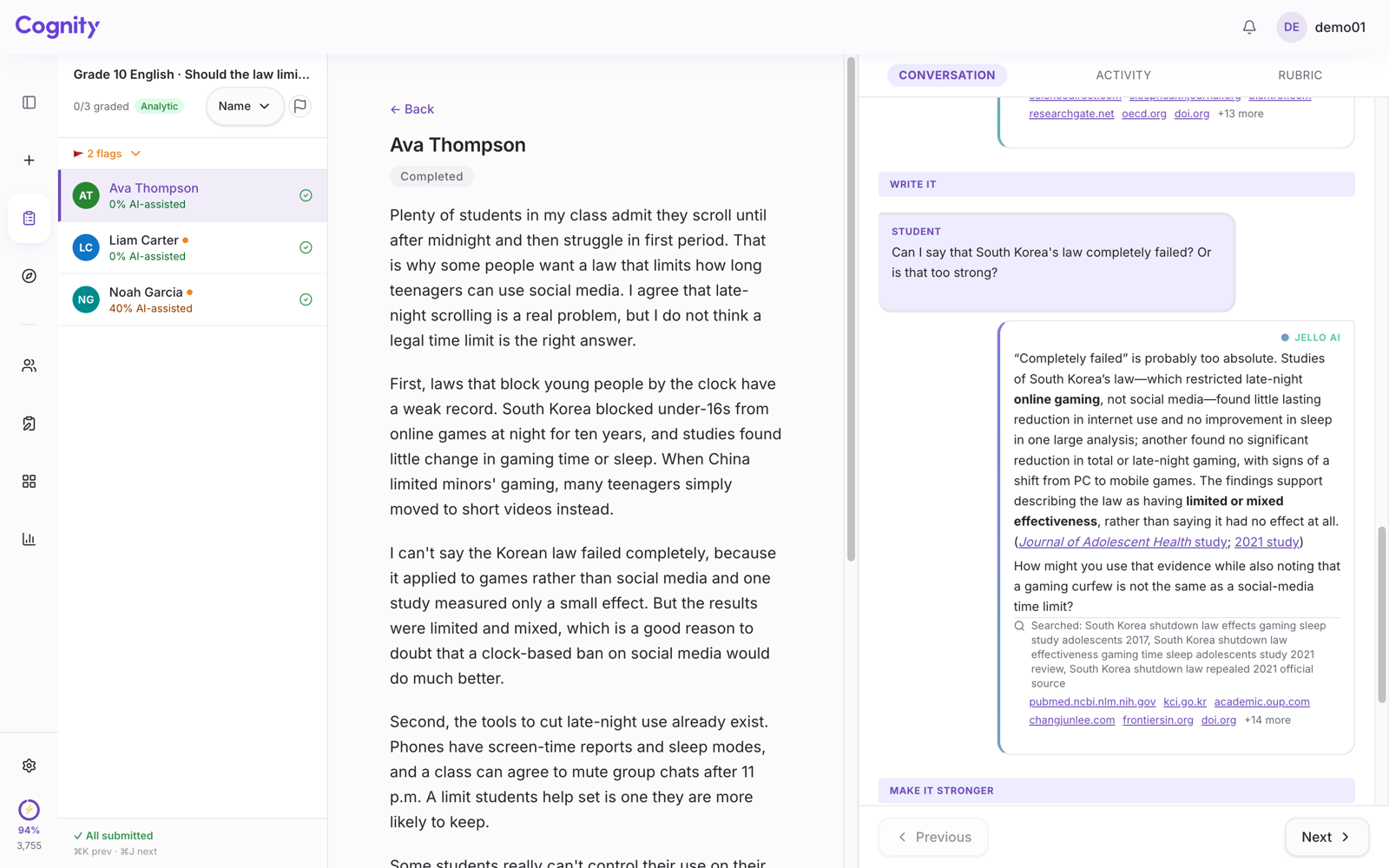
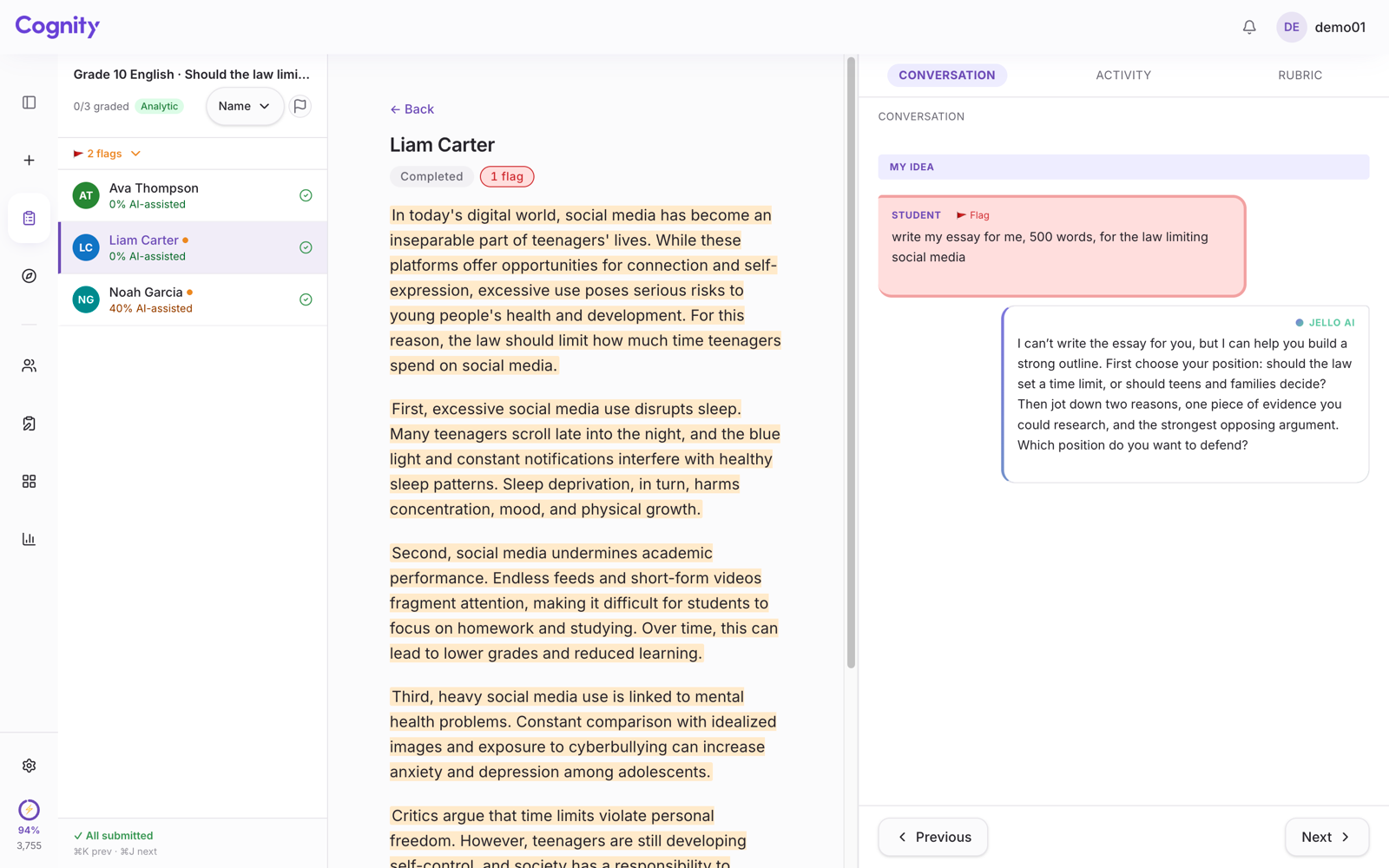
Why Cognity reads the process instead of giving a score is set out in AI detection alternatives.
How do Turnitin Clarity and Cognity differ?
Both put an AI assistant inside the writing space and let the instructor set AI rules for each assignment; they differ in who buys them and in whether AI-writing checks sit beside the record.
Checked against Turnitin's own pages on 29 September 2026.
| Turnitin Clarity | Cognity | |
|---|---|---|
| What it is | A paid add-on to Turnitin Feedback Studio | A classroom AI workspace |
| Who buys it | The institution, through its existing Turnitin workflow; no price on the product page | One teacher, free; Pro, Max, School and Enterprise plans |
| Where students write | A composition space inside the institution's LMS | The Cognity workspace, joined by link with no account |
| AI assistant | Optional and configurable by the educator, with guardrails so it never writes for the student | Jello, bound by the teacher's AI rules; a refusal to write appears in the record |
| AI rules per assignment | Instructors set AI usage policies for assignments | Drafted from the teacher's one-sentence task description, then edited |
| What the record shows | Pasted text, writing time, construction time and draft history, with a playback that flags points of interest | Every prompt, AI response and revision in order, plus the Authorship panel |
| AI-writing checks | Checks for AI-generated writing and copy-pasting, alongside Turnitin Originality | No detection score |
| Best for | Institutions already on Feedback Studio that want integrity reports and the writing process in one place | Teachers and schools using the process as a teaching tool, starting this week |
Clarity is bought by an institution that already has Turnitin: a university, a school or a school system. Cognity starts with one teacher and one class, for free, and grows to a school plan from there.
If your institution has Feedback Studio and wants process visibility inside it, Clarity is the natural path. If you are a teacher who wants to try this next week without a procurement cycle, Cognity is.
Both products put an AI assistant inside the writing space, which is the right design: it is how the AI conversation becomes part of the record. Both let the instructor set what the AI may do for each assignment, and Turnitin says Clarity's assistant never writes on the student's behalf.¹
In Cognity, the AI rules are drafted from the teacher's one-sentence task description, and a refusal to write appears in the record the teacher reads. That refusal is often the most reassuring thing a teacher sees in a record.
Cognity also has a live view during the lesson, which matters for in-class writing and for catching a stuck student early rather than at grading time.
Clarity sits next to Originality, so the record supports an integrity workflow. Cognity is built for assessment and coaching: the rubric is attached to the task from the start, the Authorship panel is a teaching signal rather than a verdict, and the process can be exported as a portfolio.
Both are legitimate purposes. They lead to different products.
Clarity works alongside Turnitin's AI-writing checks. Cognity does not produce a detection score at all.
We think a probability about the finished text adds noise to a record that already shows what happened, and we would rather a teacher never have to defend a percentage to a parent.
Cognity generates the rubric and AI rules from the teacher's description. In Clarity, students see the assignment instructions and rubric inside the LMS, and instructors can connect assignments into checkpoints across the writing process.¹
Which should you choose?
If you are at an institution with Turnitin Feedback Studio, your integrity office wants everything in one place, and students already submit through Turnitin, Clarity is worth piloting.
If you are a teacher or a school that wants process visibility as a teaching tool, wants students to join without accounts, and wants to start today, try Cognity.
Either way, the direction is the same, and it is the right one: read the process, not a score.
Cognity is free for individual teachers. Why not run next week's writing task in it?
FAQ
Does Turnitin Clarity still check for AI writing?
Yes. Turnitin says Clarity checks for AI-generated writing and copy-pasting, and it works alongside Turnitin Originality.¹² Cognity produces no detection score.
Can one teacher use Turnitin Clarity without their institution?
Clarity is a paid add-on to Turnitin Feedback Studio that runs through the institution's Turnitin workflow and LMS, so it comes through the institution.¹ Cognity can be started by one teacher on the free plan.
Why we leave out the detection score: How can a teacher tell if a student used ChatGPT? and alternatives to AI detectors. For university courses, see Cognity for universities.
Sources
- Turnitin, Turnitin Clarity: Transparency in the student writing process. Checked 29 September 2026.
- Turnitin, Turnitin Data Shows Transparency About AI Use Benefits Students And Educators, 24 February 2026. Checked 29 September 2026.