Cognity vs Grammarly Authorship: which record does a teacher need?
Grammarly Authorship lets a student record how a document was written and choose whether to share that report. Cognity, a classroom AI workspace, gives the teacher the record instead: the teacher sets AI rules for each assignment, and every prompt, AI reply and revision is kept. Authorship is a student's proof; Cognity is a teacher's view.
This comparison is written by the Cognity team, so read it with that in mind. We checked Grammarly's Authorship page, support article and announcements on 29 September 2026; they are linked at the end.
What does Grammarly Authorship show?
Authorship is a feature inside Grammarly, launched in August 2024.³ Once a student turns it on in Google Docs or Microsoft Word, it tracks how the text in the document came to be; in Grammarly's own editor it runs automatically.² Grammarly's page sums up what it records as "typed, pasted, AI-assisted."¹
When the work is done, the student can generate an Authorship report that color-codes the document by source, shows analytics such as time spent writing, and includes a replay from the first ideas to the last keystroke.¹² The student then shares a link to that report with whoever they choose.
Basic tracking and unlimited reports are free. Paid plans add detailed attribution for text copied from websites and generative AI tools, plus AI and plagiarism checks inside the report.²
Grammarly has also widened Authorship since launch. An April 2025 update added those detection flags and gave Grammarly for Education admins aggregate Authorship analytics, and Grammarly's page now lists Canvas LMS submissions among the places it works.¹⁴
Two design choices define the tool. It lives inside the student's own account, and the student decides whether to create and share a report; Grammarly says it doesn't auto-send the report to a professor or anyone else.¹
And it tracks a document, not a task. Tracking is off until the student switches it on for a document or sets it to start automatically, and it needs clipboard access to attribute pasted text. In Google Docs, text copied from a desktop app or a private browsing window is not attributed and shows as "Copied from an unknown source."²
That is the right shape for what Authorship is meant to be: a way for a student to prove their own work, which is what Grammarly's tagline, "Your name on it. Your work behind it.", says.¹ If you are a student who has been wrongly flagged by a detector, an Authorship report is a strong piece of evidence in your favor, and the basic version costs nothing.
What does Cognity show a teacher?
Cognity starts from the teacher's side of the desk. A teacher describes a task in a sentence, Cognity drafts the title, rubric, AI tutor instructions and student-facing AI rules, and the teacher edits and publishes.
Students join by link without creating an account. They work in one workspace with an AI assistant, Jello, that follows the teacher's rules for that task.
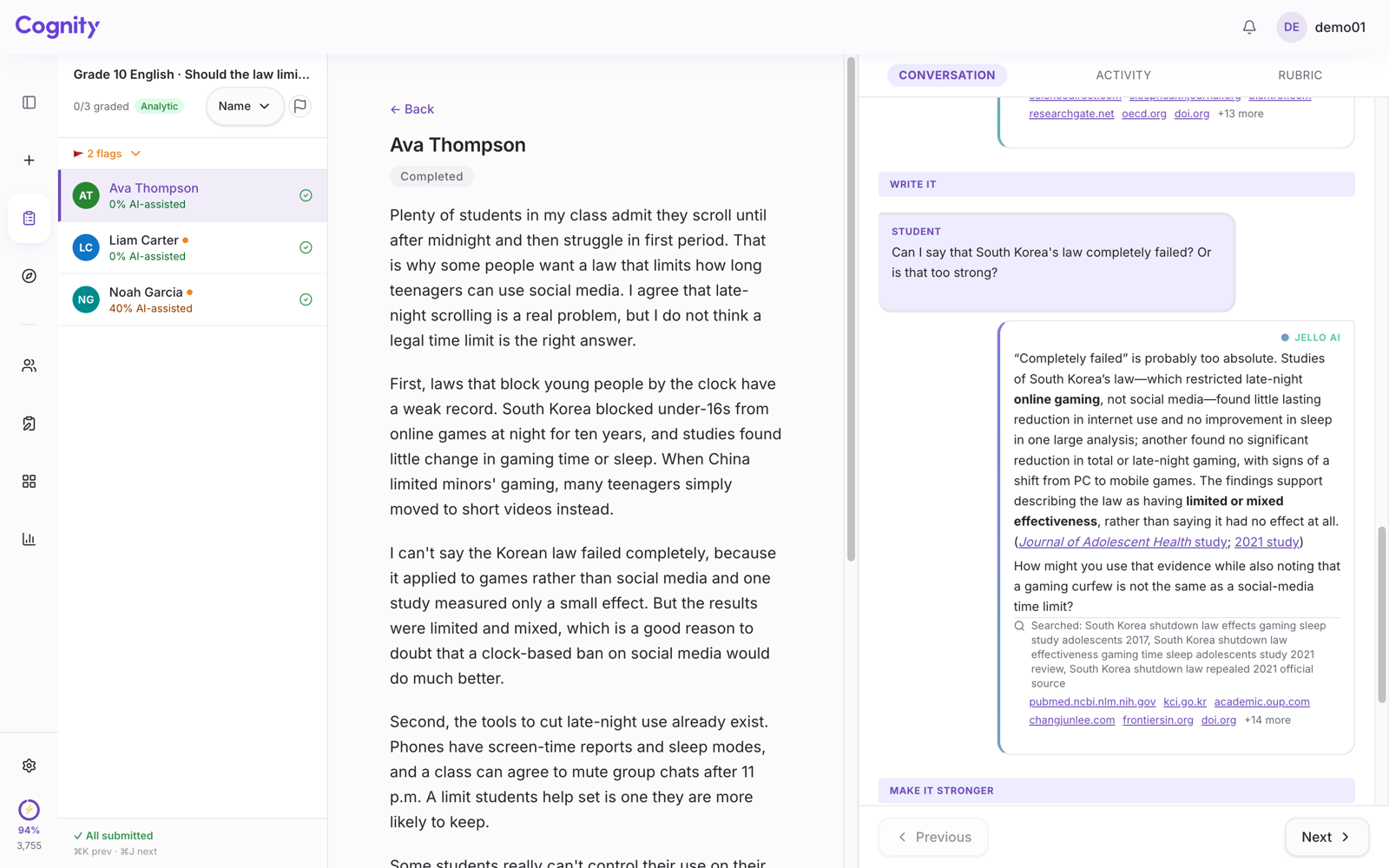
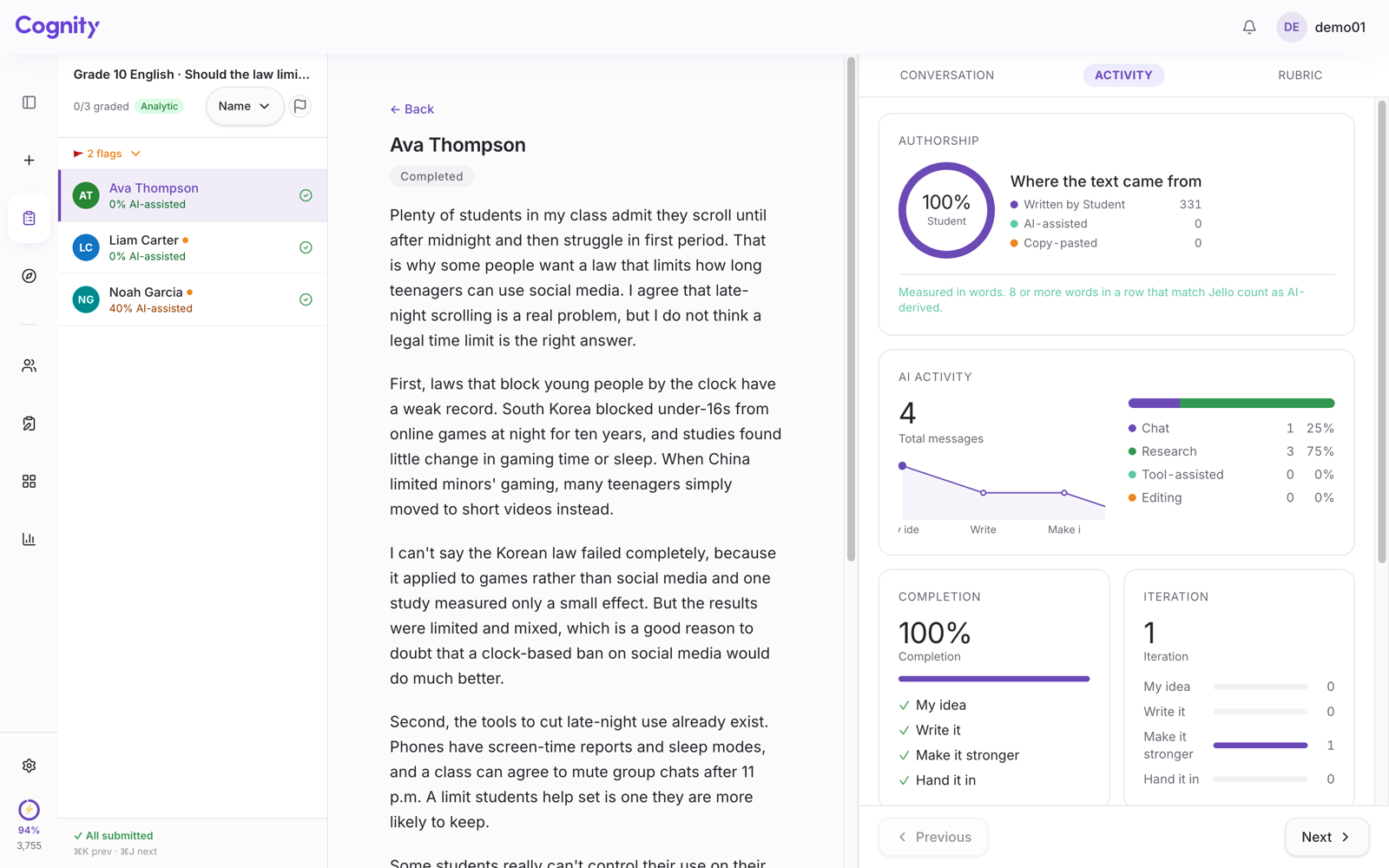
Every prompt, every AI response and every revision is recorded in order, and the teacher can watch the class live during the lesson or read each student's process alongside the submission afterwards, with the Authorship panel showing how much of the text was Written by Student, AI-assisted or Copy-pasted.
Because the AI is inside the workspace, the record is not a category label on a sentence. It is the actual conversation: what the student asked, what the AI said, what the student kept or rejected. If a student asks Jello to write the essay, it declines and coaches instead, and that refusal is in the record too.
Cognity is free for individual teachers, with 100 sparks a month and two active assignments. Pro is $12 a month billed annually, Max is $60 a month, and School and Enterprise plans add SSO and admin dashboards.
Why Cognity reads the process instead of giving a score is set out in AI detection alternatives.
How do Grammarly Authorship and Cognity differ?
Authorship is a student's record of their own document; Cognity is a teacher's record of an assignment, including the AI conversation.
Checked against Grammarly's own pages on 29 September 2026.
| Grammarly Authorship | Cognity | |
|---|---|---|
| Built for | The student, to prove their own work | The teacher, to set a task and read the process |
| Who turns it on and holds the record | The student, in their own Grammarly account; they choose whether to share the report | The teacher sets the task, so the record belongs to the class from the start |
| Where it works | Google Docs, Microsoft Word, Canvas LMS submissions and Grammarly's own editor | The Cognity workspace |
| What the record shows | Text color-coded by source (typed, pasted, AI-assisted), writing analytics and a replay | Every prompt, AI response and revision in order, plus the Authorship panel |
| The AI conversation | Not recorded; on paid plans the report can show that text was copied from a generative AI tool | Recorded in full, because the AI is inside the workspace |
| AI rules per assignment | Not part of Authorship, which records the document | Set by the teacher; the AI follows them, and its refusals are in the record |
| Detection flags | AI and plagiarism checks inside reports on paid and Education plans | No detection score |
| Institution view | Aggregate Authorship analytics for Grammarly for Education admins | Live class view; admin dashboards on School and Enterprise plans |
| Known limits | Tracks only once switched on; needs clipboard access; in Google Docs, text from a desktop app or private window shows as "Copied from an unknown source" | Work done outside Cognity shows as Copy-pasted |
| Cost | Basic tracking and reports free; detailed attribution and AI and plagiarism checks on paid plans | Free: 100 sparks a month, two active assignments. Pro $12 a month billed annually; Max $60 a month |
In Authorship, the student generates and shares the record. In Cognity, the teacher set the task, so the record belongs to the class from the moment work begins. Neither is wrong.
Authorship tells you the source of each passage and lets you replay the typing. It cannot show you what was said in the ChatGPT tab that produced a pasted paragraph, only that the paragraph was pasted and, on paid plans, that it came from an AI tool. Cognity's record includes the AI conversation itself, because the AI is part of the workspace.
For a teacher trying to understand how a student thinks, the questions the student asked are usually more informative than the source labels.
Authorship observes; it does not constrain what a student's AI may do. Cognity lets the teacher decide, per assignment, what the AI is allowed to do and not do, and the AI enforces it.
Authorship works in the documents students already use, which is a real strength when they write in many places. Cognity is a workspace with the task, rubric and AI in one place, which is the trade for a complete record.
Both have the same honest limit: work done somewhere else is invisible. Authorship labels it as copied from an unknown source, and Cognity's Authorship panel counts it as Copy-pasted. In both cases the teacher still has to have a conversation.
Which one should you use?
If you are a student, or a teacher who wants students to be able to defend their own work in a document they already use, turn on Authorship. The basic version is free, it is simple, and it works today.
If you are a teacher who wants to set the terms of AI use for a specific assignment and then read the process, not just the sources, try Cognity. The two are not exclusive: a school could reasonably let students keep Authorship on for everything and run assessed writing tasks in Cognity.
The larger point is where both tools start: a record of how the work was done tells a teacher more than a probability score about the finished text. Whichever tool gets a teacher to that record, the classroom is better for it.
Cognity is free for individual teachers. Why not run your next assessed writing task in it?
FAQ
Does Grammarly Authorship send the report to the teacher?
No. Grammarly says the student decides when to share the Authorship report, and it doesn't auto-send it to a professor or anyone else.¹
Can Grammarly Authorship show the ChatGPT conversation?
No. It can show that text was pasted and, on paid plans, that it was copied from a generative AI tool, but not what was said in a separate ChatGPT tab.² Cognity records the conversation because the AI is inside the workspace.
Related: Cognity vs Turnitin Clarity, Cognity vs Brisk Inspect Writing, and what to use instead of an AI detector. Teaching at university level? See Cognity for universities.
Sources
- Grammarly, Grammarly Authorship: Prove Your Writing Is Yours. Checked 29 September 2026.
- Grammarly Support, Introducing Authorship. Checked 29 September 2026.
- Grammarly, Grammarly Launches Grammarly Authorship to Enable Transparency in Writing Assignments for the AI Age, 14 August 2024. Checked 29 September 2026.
- Grammarly, Grammarly Authorship Just Got a Major Update, April 2025. Checked 29 September 2026.